
For this assignment, I used an Arduino Uno to control the brightness of three different colored LEDs using three separate potentiometers.
Components:
- Arduino board
- Breadboard
- 3 potentiometers
- 3 different colored LEDs (red, green, blue)
- 3 ohm resistors
- 12 wires
Extra:
I used one potentiometer to control the turning on and off of the three LEDs in sequential order.
/* POT to LED test -> by Owen Mundy March 11, 2010
 from: http://itp.nyu.edu/physcomp/Labs/AnalogIn
—————————————————————*/

// Analog input pin that the potentiometer is attached to
int potPinBlue = A0;
int potPinRed = A1;
int potPinGreen = A2;
// value read from the pot
int potValueBlue = 0;
int potValueRed = 0;
int potValueGreen = 0;
// setting pins to the LEDs
int Blueled = 9; // PWM pin that the LED is on. n.b. PWM 0 is on digital pin 9
int Redled = 10; // PWM pin that the LED is on. n.b. PWM 0 is on digital pin 10
int Greenled = 11; // PWM pin that the LED is on. n.b. PWM 0 is on digital pin 11

void setup() {
 // initialize serial communications at 9600 bps:
 Serial.begin(9600);
 // declare the led pin as an output:
 pinMode(Blueled, OUTPUT);
 pinMode(Redled, OUTPUT);
 pinMode(Greenled, OUTPUT);
}

void loop() {
 potValueBlue = analogRead(potPinRed);
 potValueRed = analogRead(potPinGreen);
 potValueGreen = analogRead(potPinBlue); // read the pot value
 // turning pins on
 analogWrite(Blueled, potValueBlue/4); // PWM the LED with the pot value (divided by 4 to fit in a byte)
 analogWrite(Redled, potValueRed/4);
 analogWrite(Greenled, potValueGreen/4);
 delay(10); // wait 10 milliseconds before the next loop
}
Extra:
byte ledPin[] = {2, 3, 4, 5, 6, 7, 8, 9, 10, 11, 12, 13}; //pins used for LED's
int potPin = 0; // analog pin used to connect the potentiometer
int val; // variable to read the value from the analog pin

void setup()
{
 for(int i = 0; i < 13; i++){
 pinMode(ledPin[i],OUTPUT);
 }

}

void loop()
{
val = analogRead(potPin); // reads the value of the potentiometer (value between 0 and 1023)
 for (int i = 0; i < 13; i++) {
 if((i * 102) > val) { digitalWrite(ledPin[i], HIGH);}
 else
 { digitalWrite(ledPin[i], LOW);}
 }
}
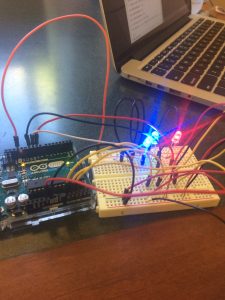
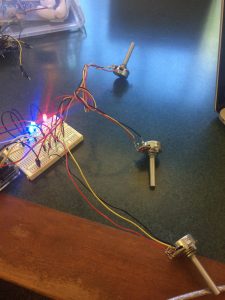
Video of me controlling LED brightness
Extra video: Sequential LEDs