
Description: For lab 2, I made my RGB LEDs have the following control mechanism:
“R” -> increase red brightness by 10%
“r” -> decrease red brightness by 10%
Similar pattern for capital and lowercase b and g for blue and green.
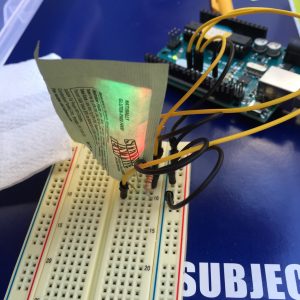
I experimented with a few things with the setup of my wiring and diffuser. First I had laid out the LEDs in a way where they were too far from each other to mix well, then I realized that it would be good to move them farther away from the resistors so that they had more space for the diffuser, so I did that by adding a few extra wires.
For the diffuser, I tried a few different things including a sugar packet, a coffee filter, a napkin, a disposable coffee cup top…
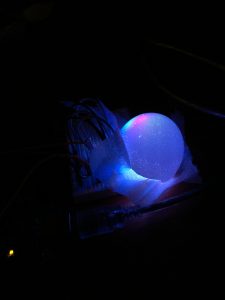
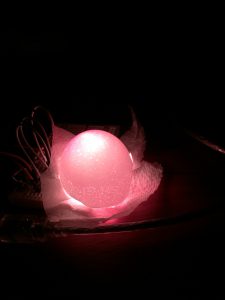
Then I tried half of an eggshell, which worked alright, but similarly to some of the other things that I tried, the color was coming through as three dots, rather than mixing nicer together. What worked best was a piece of napkin placed between the LEDs and the eggshell.
Components:
- Adruino board
- Breadboard
- 3 LEDs (red, green, blue)
- 3 220 ohm resistors
- 7 wires
- 0.5 eggshell
- 1 small piece of napkin
Code:
/*
Jake Petterson
Lab 2 -- Info 262
9/9/16

Below is the program that I wrote to control the RGB LED setup.
Users can use capital R,G,B to increase the brightness of each
LED, and lowercase r,g,b to decrease the brightness.
 */

char colorCommand; // char that will be the commmand from the user

int redPin = 9; // Red LED, connected to digital pin 9
int greenPin = 10; // Green LED, connected to digital pin 10
int bluePin = 11; // Blue LED, connected to digital pin 11

double redVal = 0;
double greenVal = 0;
double blueVal = 0;

void setup() {
 pinMode(redPin, OUTPUT); // sets the pins as output
 pinMode(greenPin, OUTPUT);
 pinMode(bluePin, OUTPUT);
 Serial.begin(9600);

 analogWrite(redPin, 0); // set them all to zero brightness
 analogWrite(greenPin, 0);
 analogWrite(bluePin, 0);

 Serial.println("Press R to increase the red brightness by 10%.\nPress"
 " G to increase the green brightness by 10%. \nPress B to increase"
 " the blue brightness by 10%.\n\nPress r, g, or b to decrease the brightness "
 "by 10%.");
 Serial.println("\nType the single letter, then press enter.");

}

void loop () {
 // set the colorCommand to a space as a placeholder.
 colorCommand = ' ';

 // send data only when you receive data:
 while (Serial.available() > 0) {
 // read the incoming byte:
 colorCommand = Serial.read();

 Serial.println("colorCommand: ");
 Serial.println(colorCommand);

 // use the adjustBrightness function'
 adjustBrightness(colorCommand, redVal, greenVal, blueVal);


 Serial.println("red: ");
 Serial.println(redVal);
 Serial.println("green: ");
 Serial.println(greenVal);
 Serial.println("blue: ");
 Serial.println(blueVal);

 colorCommand = ' ';
 }
}

// this function adjusts the brightness by
// 10% depending on the command
void adjustBrightness(char colorCommand, double &redVal, double &greenVal, double &blueVal) {
 if(colorCommand == 'r' || colorCommand == 'R') {
 if(colorCommand == 'r' && redVal != 0) {
 redVal = redVal - 25.5;
 analogWrite(redPin, redVal);
 Serial.println("Red down 10%");
 }
 else if(colorCommand == 'R' && redVal != 255) {
 redVal = redVal + 25.5;
 Serial.println("Red up 10%");
 analogWrite(redPin, redVal);
 }
 }
 if(colorCommand == 'g' || colorCommand == 'G') {
 if(colorCommand == 'g' && greenVal != 0) {
 greenVal = greenVal - 25.5;
 analogWrite(greenPin, greenVal);
 Serial.println("Green down 10%");
 }
 else if(colorCommand == 'G' && greenVal != 255) {
 greenVal = greenVal + 25.5;
 analogWrite(greenPin, greenVal);
 Serial.println("Green up 10%");
 }
 }
 if(colorCommand == 'b' || colorCommand == 'B') {
 if(colorCommand == 'b' && blueVal != 0) {
 blueVal = blueVal - 25.5;
 analogWrite(bluePin, blueVal);
 Serial.println("Blue down 10%");
 }
 else if(colorCommand == 'B' && blueVal != 255) {
 blueVal = blueVal + 25.5;
 analogWrite(bluePin, blueVal);
 Serial.println("Blue up 10%");
 }
 }
}